Showing posts with label Portfolio. Show all posts

Virtual Joystick.

This is going to be different from the rest of my other blogs. Instead of posting something minor and be on my way, I'd thought give a little insight by directly posting the code and how it works.


Here is the code below:

using System.Collections;
using System.Collections.Generic;
using UnityEngine;
using UnityEngine.UI;
using UnityEngine.EventSystems;
public class VirtualJoyStick : MonoBehaviour, IDragHandler, IPointerUpHandler, IPointerDownHandler
{
    private Image Background;
    private Image Joystickimg;
    private Vector3 inputvector;

    private void Start()
    {
        Background = GetComponent<Image>();
        Joystickimg = transform.GetChild(0).GetComponent<Image>();
     
    }
    public void OnDrag(PointerEventData ped)
    {
        Vector2 pos;
        if(RectTransformUtility.ScreenPointToLocalPointInRectangle(Background.rectTransform, ped.position, ped.pressEventCamera, out pos)){
            pos.x = (pos.x / Background.rectTransform.sizeDelta.x);
            pos.y = (pos.y / Background.rectTransform.sizeDelta.y);
            inputvector = new Vector3(pos.x * 4 + 1, 0, pos.y * 4 - 1);
            inputvector = (inputvector.magnitude > 1.0f) ? inputvector.normalized : inputvector;
            //Move joystick img
            Joystickimg.rectTransform.anchoredPosition =
                new Vector3(inputvector.x * (Background.rectTransform.sizeDelta.x / 3), inputvector.z * (Background.rectTransform.sizeDelta.y / 3));
        }
    }

    // Start is called before the first frame update
    public void OnPointerDown(PointerEventData ped)
    {
        OnDrag(ped);
    }

    public void OnPointerUp(PointerEventData ped)
    {
        inputvector = Vector3.zero;
        Joystickimg.rectTransform.anchoredPosition = Vector3.zero;
     
    }

    public float Horizontal()
    {
        if (inputvector.x != 0)
            return inputvector.x;
        else
            return Input.GetAxis("Horizontal");

    }
    public float Vertical()
    {
        if (inputvector.z != 0)
            return inputvector.z;
        else
            return Input.GetAxis("Vertical");

    }

}


 Now this seems like a huge info dump, but it's very simple and less than 100 lines. In order to initiate the code, you need to put in the UI library Unity has on the top. Second, you should use two UI images: one for the background of the joystick and the actual joystick itself. Note that the actual joystick is a child of the background image. This is to make sure the joystick itself is locked within a circle. Now joysticks work differently from a keyboard in a way. The Background.rectTransform.sizeDelta.x / 3 part is basically what lets the joystick transform and move around. Dividing the transformation basically configuring the sensitivity of the stick. The more you divide, the more tighter it becomes. Second and lastly, The public floats Vertical and Horizontal are basically just ways to create a shortcut for the inputs So instead of saying Input.GetAxis("Horizontal") to declare player input, you can simply put Joystick.Horizontal. This allows for actual player input to be received from the stick. Anyways, this is a short blog. I might get something cranked out tomorrow or later tonight, but I don't know yet. Enjoy and happy coding!

UI Scripts

Basic UI Script:


 Has Time, Health, and Energy elements which are perfect for platformers and fighting games. Update: I have also included a basic menu system within the files to help.


Github link

Player script for 3D unity games.

Hello, I recently have made a  player movement script for 3D Unity. You can check it here. 


It's basically just a simple controller script, but it works very well. I thought I would just put it here for use.

I also have a preview here.


Web Browser Pong

Got bored and had 30 minutes to spare, so I made web browser pong.

3D Runner

Hello again. I recently made a 3D platformer protoype.
You can download it here to see. It's pretty straightforward and you can add on more stuff to it. I just made this as a simple template. You can download it through my github page

Retro Arcade Racer

Hello. I recently made an old school racing game like Outrun with a little help made by an opensource gaming engine that can convert ASCII characters into objects, allowing for cool console creations. I decided to make the theme a bit more on the side of vaporwave, and got the following result.


You can see it here, along with the link to download it here as well.

Old Unity 3D Test

Here is an old test I did in Unity. I assigned a script to the cylinder to the oval and gave rigid bodies to the cubes. Very basic test.

https://twitter.com/RamiMorrar97/status/1171670133837893632?s=19

Small 2D platformer with Python Arcade.

Hello again. I made a small 2D platformer with Python Arcade Library. I will admit, I am growing on Python a lot more, and I'm liking it quite a lot. Not having to define primitive types for variables is nice. However I will say that the limited capabilities on game libraries like Arcade and Pygame, I think Python won't be replacing Unreal C++/Unity C# anytime soon. Still, this was a very simple and fun project to do. Here is a sample and here is the source code for the game. If you have windows, you might need to run it on your IDE for it to work. Another headache with Python.

A few websites I made

Hello. I just wanted to share a few of the websites I made. One is  an online soundboard, and the other is an online index/encyclopedia for a competitive fighting game.


http://samshostrats.ga/?i=1


http://bakusoundboard.tk/


Although Web development is not my first foray into programming, it was pretty fun to dip my toes into it. I especially like my SamSho strats website, especially after all that time indexing all the character pages. That was a pain. Other than that, web development is pretty easy to get a grasp of, and I definitely do see myself diving more into it as a secondary pastime.

Shigechi Discord Bot

How do you do, fellow kids? Just kidding. I'm 22. Anyways, I'm writing to show you guys a cool project I have been working on. Ever heard of Discord? You know those things called Bots? Well I made one of those in C# with the help of the Discord.net API made by LtLi0n over on Github. Anyways, I based this bot and its commands off the character Shigechi, from Jojo's Bizarre Adventure, based on his unique stand, Harvest, a spiritual entity that takes shape in the form of bee like humanoids and can collect objects/make decompose small objects.


ShigechiBot follows some of the same concepts, but in Discord form. It can  give resources to programming guides/websites, give resources for competitive gaming, and resources on how to cook, and much more in the future as I keep updating. This was a great project. I had a lot of fun creating it, and have gained a better understanding of C# better than the rest of those stupid coding books that make you do a whole bunch of unfinished projects and don't really teach you anything.

For a much bigger update, I intend to incorporate bigger commands, like searching images from an online database, Youtube Video Search straight on the application, and hopefully soon. 

Anyways, if you want to check out the bot, you can click right here for the invite link.

Snake Game in Python

Hello again. I made a snake game in Python.

Here is the source code.

import random
import curses

s = curses.initscr()
curses.curs_set(0)
sh, sw = s.getmaxyx()
w = curses.newwin(sh, sw, 0, 0)
w.keypad(1)
w.timeout(100)

snk_x = sw/4
snk_y = sh/2
snake = [
    [snk_y, snk_x],
    [snk_y, snk_x-1],
    [snk_y, snk_x-2]
]

food = [sh/2, sw/2]
w.addch(int(food[0]), int(food[1]), curses.ACS_PI)

key = curses.KEY_RIGHT

while True:
    next_key = w.getch()
    key = key if next_key == -1 else next_key

    if snake[0][0] in [0, sh] or snake[0][1]  in [0, sw] or snake[0] in snake[1:]:
        curses.endwin()
        quit()

    new_head = [snake[0][0], snake[0][1]]

    if key == curses.KEY_DOWN:
        new_head[0] += 1
    if key == curses.KEY_UP:
        new_head[0] -= 1
    if key == curses.KEY_LEFT:
        new_head[1] -= 1
    if key == curses.KEY_RIGHT:
        new_head[1] += 1

    snake.insert(0, new_head)

    if snake[0] == food:
        food = None
        while food is None:
            nf = [
                random.randint(1, sh-1),
                random.randint(1, sw-1)
            ]
            food = nf if nf not in snake else None
        w.addch(food[0], food[1], curses.ACS_PI)
    else:
        tail = snake.pop()
        w.addch(int(tail[0]), int(tail[1]), ' ')

    w.addch(int(snake[0][0]), int(snake[0][1]), curses.ACS_CKBOARD


This was my first foray into Python, and it was very... weird. I usually program into more lower-level languages like C# and C++, or something with understandable syntax like HTML. Python is just... very weirdly structured. I still understand most of the syntax, but there isn't a whole lot you can mess around with in the context of your program. Especially in the context of being universal. The simplicity of the language doesn't give much to work with, and is pretty slow. It's good for making small games and web/widget applications, but is not great in much else. I may develop a Discord bot in Python, since there is a framework out for it and I do want to learn the language in order to code faster. I do not think however it will replace C++/C# for me.

Universal MineSweeper

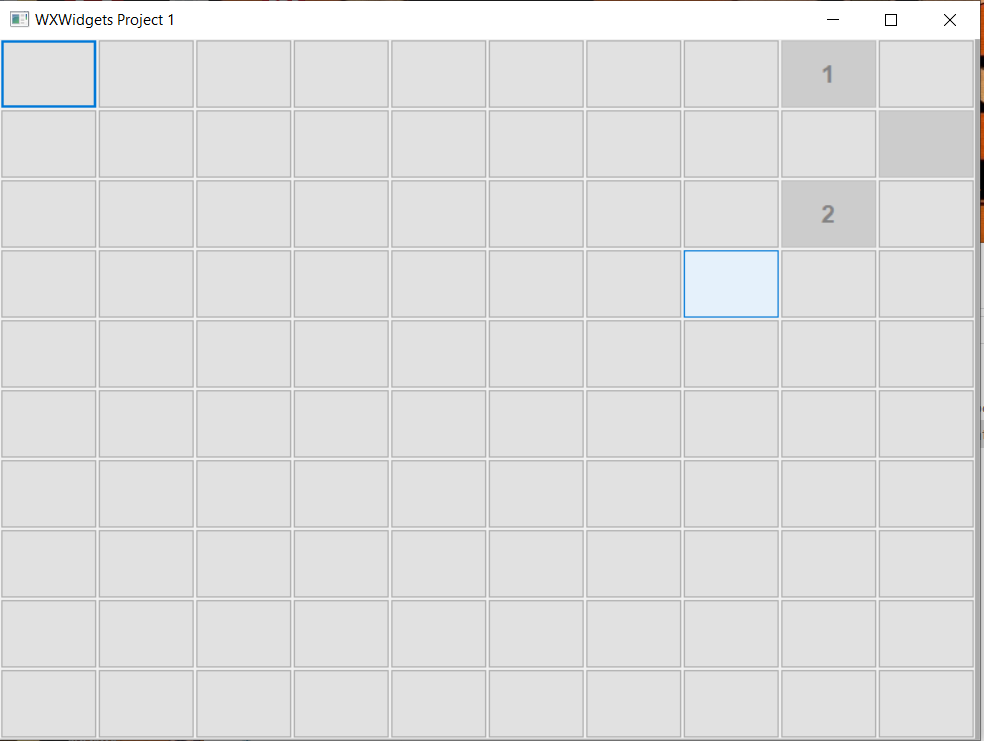
Hello. I recently made a simple application game using the wxWidgets framework and C++. It's quite a simple game to play and it was a nice test using wxWidgets. With some simple button events, if-else statements, and for loops, there is Minecraft. Although it is very simple graphically, the great thing about this application is that it's universal on all desktop platforms(Windows/Linux/Mac) thanks to wxWidgets' multisystem/OS handling and threading, making it easy to speed up development processes. Anyways, I hope you enjoy playing this as much as I did making it. It's quite addicting actually.

You can download it here.


Officially Retiring This Blog

This blog has now been sunset as of Today on this very date. No more posts here.  Instead, you can follow my Youtube channel here. https://w...